
Builder Scripts
Builder scripts provide additional controls for an element. You can define any settings required by the element you create.
You can use the pixe_enqueue_builder_script action to register builder scripts.
Register Element Options
In the script file, add the following code within the jQuery scope to register your custom element.
$.pixeRegisterElementSettings('my-custom-element', {
    'general': {
        'title': 'General',
        'section': {
            'overall': {
                'title': 'Overall',
                'options': {
                    'custom-text': {
                        'title': 'Text Box',
                        'type': 'text',
                        'width': '1-1'
                    },
                    'custom-color': {
                        'title': 'Color',
                        'type': 'colordisplay',
                        'width': '1-1'
                    },
                }
            },
            'spacing': 'spacing'
        }
    },
    'advance': $.pixeItemAdvanceSettings
});
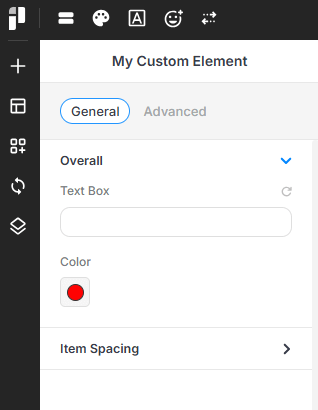
This code creates a “General” section with an “Overall” subsection that contains “Text Box” and “Color” inputs. The object key ('custom-text', 'custom-color') is used as the slug for storing the settings data.
Any changes to the input values will be passed to the render_content function of the registered element.
You can learn more about inputs here.