Whether you are moving up from the free version or looking to expand your current Pro license to a higher tier, upgrading your account is quick and straightforward. You can choose between our Personal, Plus, and Agency plans depending on how many site activations you need.
Upgrading from the Free Tier
If you are currently using the free version of PixeBuilder, you will need to purchase a new Pro license to unlock premium features and templates.
- Navigate to our official pricing page at pixebuilder.com/pricing.
- Select the Personal, Plus, or Agency plan that fits your needs and complete the checkout process.
- Download the Pro version plugin file from your account.
- Upload, install, and activate the Pro plugin directly on your WordPress site.
Upgrading an Existing Pro Plan
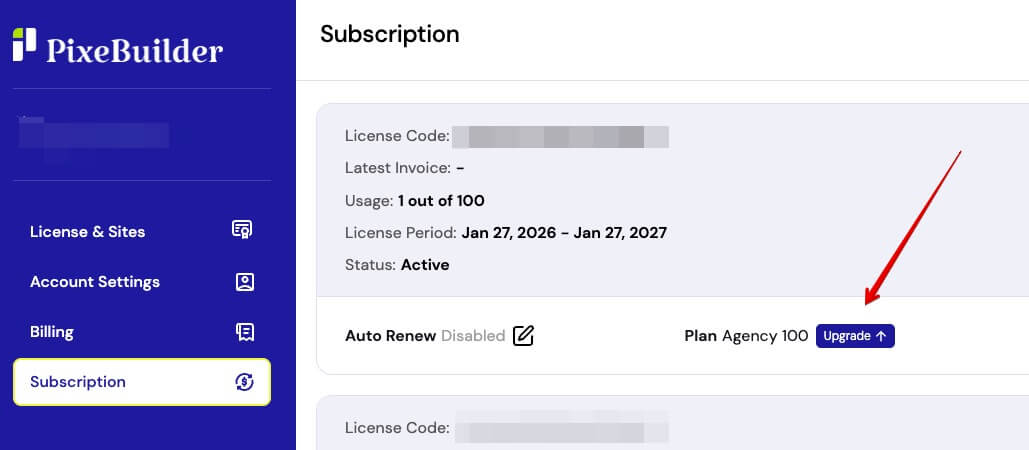
If you already have an active paid subscription (such as the Personal or Plus plan) and want to increase your site limits by upgrading to a higher tier, you can do this seamlessly directly from your account dashboard.
- Log in to your account at account.pixebuilder.com.
- Navigate to the Subscription menu located on the left-hand sidebar.
- Locate your current plan details and click the blue Upgrade button situated right next to it. From there, you can select your new tier and the system will guide you through the process.