
WooCommerce Items
The WooCommerce in PixeBuilder will contain several parts:
WooCommerce Items: it's general items to create WooCommerce product pages, shop pages, cart pages, checkout pages, etc.
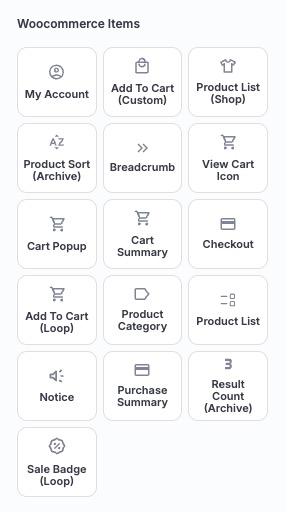
Elements List
My Account
Displays WooCommerce account links such as login, orders, downloads, and account details.
Add to Cart (Custom)
Adds a customizable Add to Cart button that can be styled independently from default WooCommerce layouts.
Product List (Shop)
Outputs a list of products for shop or archive pages, following query and layout settings.
Product Sort (Archive)
Allows users to sort products by criteria such as popularity, rating, price, or latest.
Breadcrumb
Displays the navigation path (Home > Category > Product) to help users understand their location.
View Cart Icon
Shows a cart icon that links to the Cart page with item count support.
Cart Summary
Displays a summary of items currently in the cart, including totals.
Checkout
Outputs the WooCommerce checkout form for billing, shipping, and payment.
Add to Cart (Loop)
Adds an Add to Cart button specifically for product loops (shop or archive listings).
Product Category
Displays the product’s assigned categories.
Product List
Shows a configurable list of products, commonly used in custom layouts or sections.
Notice
Displays WooCommerce system notices such as errors, warnings, or success messages.
Result Count (Archive)
Shows the number of products found in the current query (e.g., “Showing 1–9 of 24 results”).
Sale Badge (Loop)
Displays a “Sale” badge on discounted products within product loops.
Cart Popup
Shows a popup with the current cart contents and totals, letting customers review their cart without leaving the page.
Purchase Summary
Displays a summary of the order/purchase, including line items, quantities, and totals.
WooCommerce Single Product Items
WooCommerce Single Product Items: it's specific items to create single product pages unique layouts.
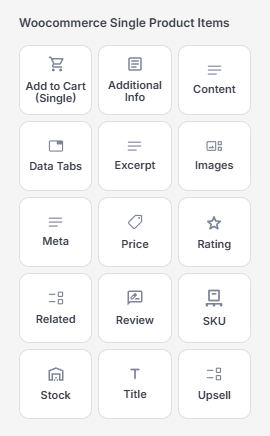
Elements List
Add to Cart (Single)
Displays the Add to Cart form for a single product, including quantity and variations.
Additional Info
Displays the product additional information, such as the contents of the Additional Information tab.
Content
Displays the main product description content.
Data Tabs
Shows product tabs like Description, Additional Information, and Reviews.
Excerpt
Outputs the short product description.
Images
Displays the product image gallery, including featured and gallery images.
Meta
Shows product meta information such as SKU, categories, and tags.
Price
Displays the product price, including sale pricing when applicable.
Rating
Shows the product’s average rating using star icons.
Related
Displays related products to encourage further browsing and additional purchases.
Review
Outputs the product reviews and review submission form.
SKU
Displays the product’s SKU (Stock Keeping Unit).
Stock
Shows stock status such as In Stock, Out of Stock, or quantity remaining.
Title
Displays the product title.
Upsell
Shows upsell products configured in the product settings to encourage higher-value purchases.