
Elements Preview
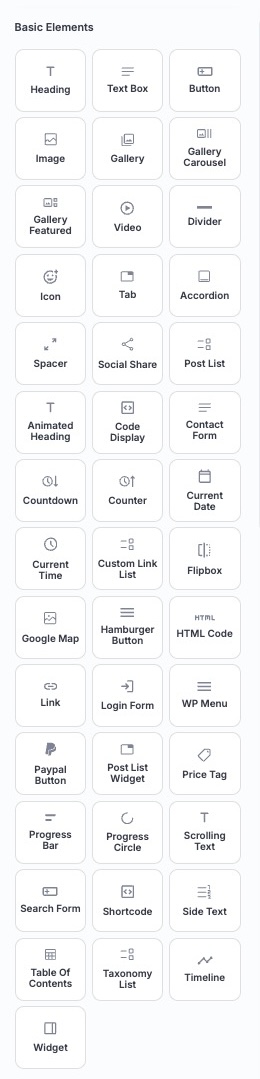
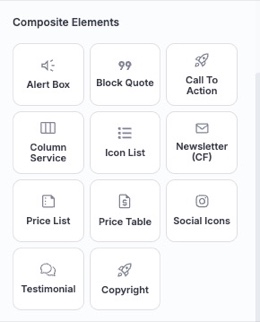
With our page builder, you can leverage 80 unique elements to craft the ideal layout and elevate its visual appeal with ease.
Elements List
We will break down all 80 elements one by one, providing detailed information to help you utilize them more effectively for your specific needs.
Heading
Add a standard heading to structure your content and improve readability.
Text Box
Add a styled text box for highlighting important information, quotes, or announcements.
Button
Insert customizable buttons for calls to action, linking to other pages, or triggering specific actions.
Image
Add and customize images to enrich your content and improve visual storytelling.
Gallery
Present a grid or collection of images for a clean and organized visual display.
Gallery Carousel
Display images in a sliding carousel format, ideal for portfolios or product showcases.
Gallery Featured
Highlight a featured image gallery with a prominent layout to draw attention.
Video
Embed videos from various sources to enrich your content with multimedia elements.
Divider
Insert a horizontal line to separate sections, improving readability and structure.
Icon
Include scalable icons to enhance visual elements or emphasize specific points.
Tab
Create tabbed sections to organize content, allowing users to switch between different views within the same area.
Accordion
Organize content into collapsible panels that expand and collapse, ideal for FAQs and space-saving layouts.
Spacer
Insert adjustable empty space between elements to improve layout flow and visual separation.
Social Share
Include buttons for sharing content on social media platforms, encouraging engagement and content distribution.
Post List
Create a list of posts, customizable by category, tag, or other filters.
Animated Heading
Add dynamic, eye-catching headings with animation effects to grab attention and emphasize key messages.
Code Display
Showcase code snippets with proper formatting, ideal for tutorials or developer-focused content.
Circular Text
Wrap text along a circular path for eye-catching badges, seals, or rotating labels.
Contact Form
Add a customizable contact form so visitors can send messages or inquiries directly from your page.
Countdown
Display a countdown timer for events, launches, or deadlines to create urgency and engagement.
Counter
Add animated counters to highlight stats, achievements, or milestones in a visually appealing way.
Current Date
Automatically display the current date, useful for time-sensitive content or dynamic updates.
Current Time
Show the current time, great for live updates or time-specific features on your page.
Custom Link List
Build a tailored list of custom links to guide users through your site with ease.
Dark Mode Toggle
Add a toggle that lets visitors switch between light and dark appearance, with dark colors defined via the Variable Manager.
Flipbox
Create interactive cards that flip to reveal additional content, perfect for showcasing features or services.
Google Map
Embed an interactive Google Map to show locations, directions, or business addresses.
Hamburger Button
Add a compact, collapsible menu button (often styled as three lines) for mobile-friendly navigation.
HTML Code
Insert custom HTML code to add unique functionality or design elements to your page.
Link
Add a styled link or anchor to direct users to other pages, sections, or external resources.
Login Form
Provide a user login interface for secure access to restricted areas of your site.
WP Menu
Display a WordPress navigation menu to help users explore your site efficiently.
Paypal Button
Integrate a PayPal button for seamless payment processing or donations.
Post List Widget
Display a list of blog posts or articles, perfect for showcasing recent or featured content.
Price Tag
Display pricing information in a visually appealing tag format, ideal for product or service offerings.
Progress Bar
Show progress or completion status with a horizontal bar, perfect for tracking goals, skills, or stages.
Progress Circle
Present progress in a circular format, offering a modern alternative to the progress bar for visual impact.
Scrolling Text
Display moving or marquee-style text to highlight announcements, offers, or key messages.
Search Form
Add a search field that lets visitors quickly find content across your site.
Shortcode
Embed custom shortcodes to add dynamic functionality or third-party integrations to your page.
Side Text
Add text alongside other elements, useful for annotations, captions, or supplementary information.
Star Rating
Display a star rating to showcase reviews, scores, or product quality at a glance.
Table
Build a structured data table with header, body, and footer rows to present information side by side. For small screens, Table Settings → Small Screen Layout lets the table scroll sideways (with an optional sticky first column) or show one column at a time with switch buttons.
Table of Contents
Generate a clickable table of contents for easy navigation, especially useful for long-form content.
Taxonomy List
Display a list of taxonomy terms (such as categories or tags) to help users browse related content.
Timeline
Display events or milestones in a chronological timeline format, great for storytelling or project histories.
Widget
Integrate custom widgets to add dynamic functionality, such as recent posts or social media feeds.
Alert Box
Display styled alert or notice boxes to highlight warnings, tips, or important messages.
Block Quote
Highlight quotes or testimonials in a styled format to make them stand out within your content.
Call To Action
Combine a heading, text, and button into a ready-made call-to-action block to drive conversions.
Column Service
Showcase services or features in a structured column layout with icons, titles, and descriptions.
Icon List
Present a list of items paired with icons, ideal for features, benefits, or checklists.
Price List
Display a styled list of items with prices, perfect for menus or service pricing.
Price Table
Create comparison-style pricing tables to present plans and packages clearly.
Social Icons
Add a set of linked social media icons to connect visitors with your profiles.
Testimonial
Showcase customer testimonials or reviews in an attractive, trust-building layout.
Copyright
Display a dynamic copyright notice, often used in footers, that can auto-update the year.
Newsletter (CF)
Add a ready-made newsletter signup form with an email field and a subscribe button, built on the Contact Form element.
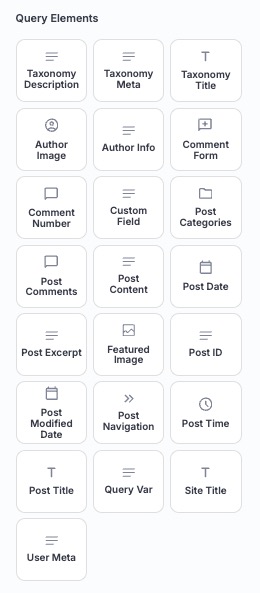
Query Elements List
These elements are designed to dynamically pull and display post-related data, making them ideal for blogs, archives, or content-heavy sites.
Taxonomy Description
Display the description of the current taxonomy term (such as a category or tag) archive.
Taxonomy Meta
Show meta information for the current taxonomy term, useful on category or tag archive pages.
Taxonomy Title
Display the title or name of the current taxonomy term archive.
Author Image
Show the author profile image, adding a personal touch to posts or author pages.
Author Info
Display detailed information about the post author, such as their bio or contact details.
Comment Form
Add a form for users to leave comments on posts, fostering interaction and engagement.
Comment Number
Show the total number of comments on a post, encouraging user participation.
Custom Field
Output the value of a custom field (post meta) for dynamic, data-driven content.
Post Categories
List the categories associated with a post, helping users navigate related content.
Post Comments
Display the comments section for a post, allowing users to view and engage with discussions.
Post Content
Render the main content of a post, ensuring it is presented clearly and consistently.
Post Date
Show the publication date of a post, providing context for its relevance.
Post Excerpt
Display a short summary or excerpt of a post, ideal for previews or teasers.
Featured Image
Highlight the post featured image, adding visual appeal to your layout.
Post ID
Display the unique ID of a post, useful for developers or advanced customization.
Post Modified Date
Show the date a post was last updated, useful for content transparency.
Post Navigation
Add navigation links to move between posts, improving user experience on blogs.
Post Time
Show the exact time a post was published, complementing the post date for precision.
Post Title
Display the title of a post, ensuring it is prominent and clickable for easy access.
Query Var
Output a query variable value, enabling advanced dynamic and conditional content.
Site Title
Display your site title, useful in headers, templates, or dynamic layouts.
User Meta
Show user meta information for the current or specified user, ideal for profile or membership layouts.